
Most nonprofits do not have an IT department. They have an operations director who also manages the network, a development staffer who knows the donor database, and a volunteer who “is good with computers.” That works until a laptop is stolen, a phishing email reaches the finance team or a grant application asks how you protect client data.
Managed IT services for nonprofits exist to fill that gap. For executive directors, CFOs and boards across Northeast Ohio, the question is not whether to get outside help. It is what a good partner should actually deliver, and how to tell a partner from a vendor who simply answers the phone.
1. What Are Managed IT Services for Nonprofits?
Managed IT means an outside provider takes ongoing responsibility for your technology for a predictable monthly fee. Instead of calling someone when something breaks, the provider monitors, maintains, secures and plans your systems continuously.
For a nonprofit, the difference from a commercial engagement is context. A good partner understands that your budget is tied to grants and donations, that volunteers and part-time staff come and go, that board members may need access, and that donor and client trust is your most valuable asset.
2. What Should a Lean Team Expect From an IT Partner?
Responsive Help for Every User
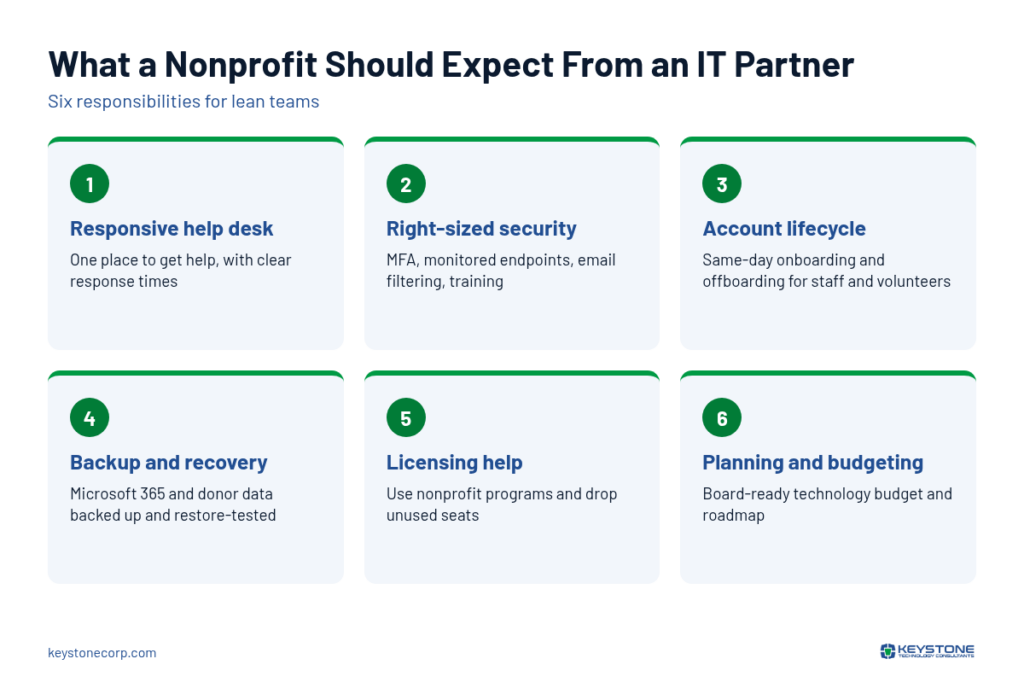
Staff should have one place to get help, by phone, email or portal, with clear response times. Most issues are resolved remotely within minutes, which suits organizations with multiple sites or hybrid staff.
Security That Fits a Small Team
Nonprofits are attractive targets because they handle payments, personal data and donor relationships, often with lighter defenses. CISA includes civil society organizations among its high-risk communities and offers free resources for them. A partner should handle the fundamentals we outlined in cybersecurity for nonprofits: multi-factor authentication, endpoint protection with monitoring, email filtering and regular training.
Accounts That Match Reality
Volunteers, interns and seasonal staff create account sprawl. A partner should run a clear onboarding and offboarding process so that when someone leaves, their access to email, files and the donor database ends the same day. Shared logins should be replaced with individual accounts wherever possible.
Backups and Recovery
Donor records, case files and grant documents need to be backed up, including Microsoft 365 or Google Workspace data, and restores should be tested. A partner should be able to tell you how long it would take to get running again after a ransomware attack or a failed server.
Help Using Nonprofit Licensing Programs
Many software companies offer donated or discounted licenses to eligible nonprofits. Microsoft publishes its nonprofit plans and pricing, and TechSoup helps nonprofits access donated and discounted technology from many vendors. A good partner helps you claim what you qualify for and keeps licensing tidy, so you are not paying for seats nobody uses.
3. Planning and Budgeting, Not Just Fixing
The difference between a vendor and a partner shows up in planning. A partner should meet with leadership regularly to review risks, replacement cycles and upcoming needs, and produce a technology budget you can bring to the board.
That matters for grants. Funders increasingly expect organizations to describe how they protect data and maintain systems, and some grants can fund technology directly. A partner who helps you build a multi-year plan, like the one in our 12-month nonprofit IT modernization roadmap, makes those requests easier to write and easier to justify. This strategic role is often called virtual CIO guidance.
4. How Is a Partner Different From a Vendor?
| A vendor | A partner |
| Waits for you to call | Monitors and reaches out first |
| Sells products | Recommends what fits your mission and budget |
| Speaks in technical terms | Explains risks in terms of donors, programs and funding |
| Bills for every change | Includes routine work in a predictable fee |
| Meets when there is a problem | Meets regularly to plan |
5. What If We Already Have Someone Handling IT?
Many nonprofits have a staff member or a long-time volunteer who knows their systems well. That knowledge is valuable and should not be lost. Co-managed IT lets that person keep the work where local knowledge matters, such as the donor database or program software, while the partner covers security monitoring, patching, backup and after-hours support. It gives one person a team behind them without adding headcount.
6. What This Means for Northeast Ohio Nonprofits
Nonprofits in Cleveland, Akron and Canton often run lean and serve communities that depend on them every day. Downtime means missed services, not just lost productivity. A predominantly remote support model keeps costs predictable while still covering multiple program sites, with on-site visits saved for hardware and projects.
When evaluating providers, ask for specifics: how they handle volunteer accounts, how they test backups, whether they help with nonprofit licensing and how often they will meet with leadership. The answers will show you quickly whether you are talking to a partner.
Frequently Asked Questions
Often, yes. Managed IT replaces unpredictable repair bills with a fixed monthly cost, and a partner who helps you use nonprofit licensing programs can offset part of it. For very small teams, a co-managed or security-focused arrangement can provide essential protection at a lower cost than full coverage.
The essentials are reliable user support, multi-factor authentication, monitored endpoint protection, tested backups and a clean process for adding and removing staff and volunteers. Beyond that, planning and budgeting help leaders make technology decisions that support the mission and stand up to board and funder scrutiny.
For most day-to-day needs, yes. The majority of issues, from password problems to software errors, are resolved faster remotely. On-site visits are still useful for hardware installs, network changes and office moves, so look for a partner that offers both with remote support as the default.
The Bottom Line
Managed IT services for nonprofits should give a lean team the depth of an IT department without the overhead. Expect responsive support, practical security, disciplined account management, tested backups, help with licensing and a seat at the planning table. For mission-driven organizations across Northeast Ohio, that partnership frees leaders to focus on the people they serve.