A couple of years ago, we wrote that passwords are your company’s weakest link. That advice still holds, but the industry has moved on from making passwords stronger. It is now replacing them.
Microsoft reports that people signing in to their Microsoft accounts with passkeys succeed about 98% of the time, compared with 32% for passwords, and that passkey sign-ins are eight times faster than a password plus multi-factor authentication (MFA). The more secure option is also the easier one.
For manufacturers and nonprofits across Northeast Ohio, from Cleveland and Akron to Canton, the question is no longer whether passkeys for business are coming. It is how to adopt them without locking anyone out or disrupting the shop floor or the front office.
1. What Is a Passkey?
A passkey is a sign-in credential that replaces your password with a pair of cryptographic keys:
- A public key that the service (Microsoft 365, Google, your donor platform) stores. It is not secret and is useless on its own.
- A private key that stays on your device or in your password manager. It is never sent to the service.
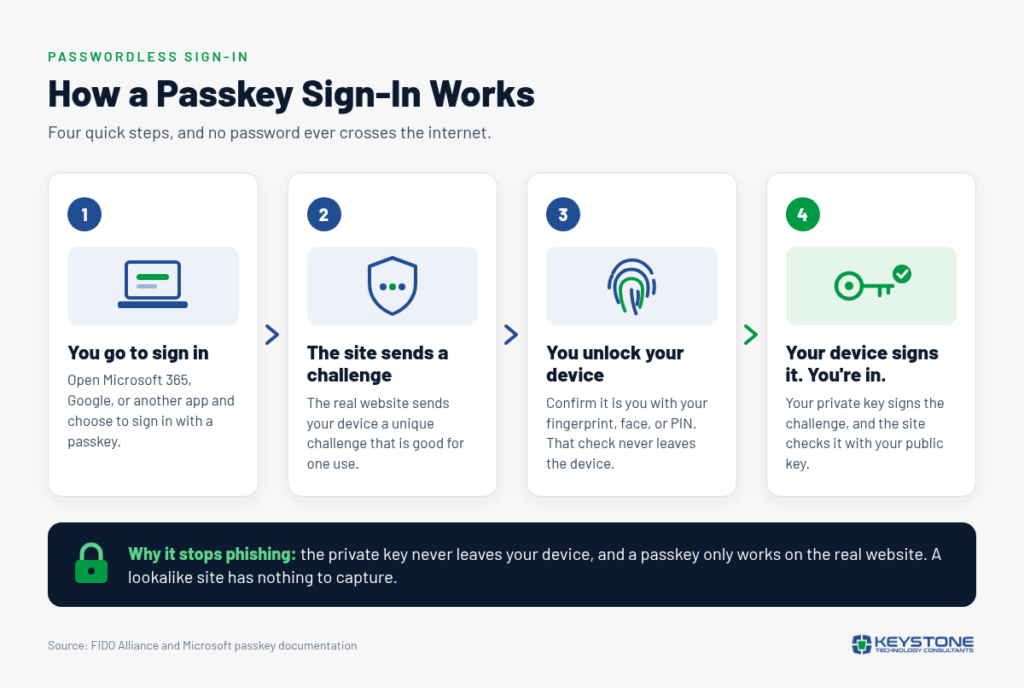
When you sign in, the service sends a one-time challenge. Your device signs it with the private key after you unlock it with your fingerprint, face, or PIN, and the service checks the signature with the public key. Your fingerprint and PIN never leave the device.
Passkeys are built on open standards from the FIDO Alliance, so they work across Windows, Apple, Android, and major browsers.
2. Why Passkeys Are Phishing-Resistant
Nothing to Steal, Nothing to Reuse
If a software vendor is breached, attackers get only public keys, which cannot be used to sign in. And because every passkey is unique to one account, credential stuffing, which tries leaked passwords across many sites, has nothing to work with.
Nothing to Type Into a Fake Site
A passkey is tied to the real website’s address. If an employee clicks a link to a lookalike Microsoft 365 page, their device will not offer the passkey. As CISA puts it, even when someone falls for a phishing email, “the attack will still fail.” That matters more as AI makes phishing harder to spot: Microsoft has seen AI-enabled phishing campaigns reach click-through rates as high as 54%, versus roughly 12% for traditional ones.
3. Passkeys vs. Passwords and Traditional MFA
Any MFA beats none, but MFA codes and push prompts can still be beaten. A code can be typed into a fake page and relayed in seconds, push prompts can be “bombed” until a tired employee taps Approve, and text-message codes can be hijacked through SIM swapping. CISA’s guidance calls phishing-resistant MFA, the category passkeys belong to, “the gold standard.”
| Consideration | Passwords | Password + MFA Codes or Push | Passkeys |
| What the user does | Remembers and types a secret | Types a password, then a code or approval | Unlocks a device with fingerprint, face, or PIN |
| Can it be phished? | Yes, easily | Yes, codes and approvals can be relayed | No, it only works on the real site |
| Vendor data breach | Passwords exposed | Passwords exposed; MFA limits damage | Only useless public keys exposed |
| Reuse across accounts | Common | Common for the password | Not possible |
| Help desk burden | Frequent resets | Resets plus MFA device issues | Fewer resets; needs a solid recovery process |
4. Where Passkeys Work and How They Are Stored
Microsoft Entra ID supports passkeys in every edition with no extra license, and Microsoft has begun making them the default sign-in method. Google Workspace admins can let users skip passwords in favor of passkeys.
Passkeys come in three forms:
- Synced passkeys live in an Apple, Google, or password manager account and follow the user to new devices. Microsoft’s guidance calls them a good fit for most users, with stronger options for privileged accounts.
- Device-bound passkeys never leave one device, such as the Microsoft Authenticator app. IT gets more control, but a lost device means re-enrolling.
- Hardware security keys are small USB or NFC devices unlocked with a PIN or fingerprint. They need no phone and are the strongest choice for administrators.
5. Practical Business Considerations
Shared Workstations and Staff Without Company Phones
A passkey saved on a shared production PC turns everyone who uses it into the same person. Individual security keys work better: operators tap their own key and enter a PIN, even with gloves on. Keys also cover employees who have no company phone or prefer not to put work accounts on a personal device.
Volunteers at Nonprofits
As with other nonprofit cybersecurity basics, start by confirming who truly needs access to core systems. For a volunteer treasurer or a board member with donor records, a passkey on their own phone beats a shared password. Remove access promptly when their term ends.
Lost Devices and Recovery
As sign-in gets harder to attack, criminals target recovery, often through impersonation, such as a help desk call from someone posing as an employee. Define how you will verify identity before issuing a new credential, register two passkeys or keys per person, and use a time-limited Microsoft Entra Temporary Access Pass rather than a text-message reset.
Legacy Apps
Older ERP systems, plant-floor OT software, and on-premises servers will keep using passwords for a while. Put them behind single sign-on where you can, keep the rest in a password manager with MFA, and plan their retirement.
6. Roll Out in Phases
CISA recommends a phased rollout that starts with high-value accounts:
- Phase 1: Administrators and IT accounts, including those used by an outside or co-managed IT partner, on device-bound passkeys or security keys.
- Phase 2: Finance, payroll, and leadership: anyone who can move money or access donor and employee data.
- Phase 3: Office staff, then shop floor, field staff, and volunteers.
- Phase 4: Retire text-message codes and other weak fallbacks.
Most of this can be done remotely: Microsoft can prompt users to register at their next sign-in, and security keys can be shipped.
Passkeys for Business: Quick Answers
Yes. Passkeys are a form of phishing-resistant MFA. A one-time code or push approval from an authenticator app can be relayed through a fake site in seconds. A passkey works only on the real website it was created for.
No. Passkeys can also live on a company-managed laptop or on a hardware security key unlocked with a PIN. Security keys suit shared shop-floor workstations and staff or volunteers who do not use a phone for work.
No. Microsoft Entra ID, the sign-in system behind Microsoft 365, supports passkeys in every edition with no extra license. The main costs are security keys for the roles that need them and time to plan enrollment and recovery.
The Leadership Takeaway: Sign-In Is a Business Decision
For years, protecting accounts meant asking people to remember more and make perfect judgment calls in a split second. Passkeys reverse that. A convincing phishing email or fake login page simply has nothing to capture.
The technology is ready, and the major platforms are moving with or without you. The Northeast Ohio manufacturers and nonprofits that benefit most will be those whose leaders decide on purpose who goes first, how recovery works, and which legacy systems still need attention. Treat sign-in like any other critical business process: define it, own it, and improve it in deliberate steps.